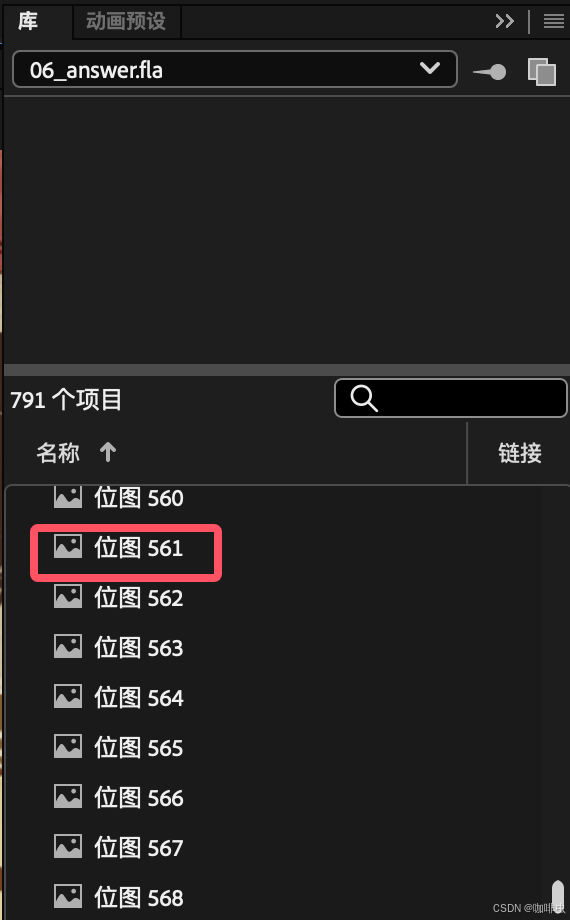
Adobe Animate projects often collect many library items from Photoshop, pasted images, and manually named symbols. If those names include Chinese characters, spaces, or inconsistent prefixes, exported JavaScript or CreateJS workflows can become harder to maintain and may hit encoding or reference issues in some deployment environments.
When there are dozens or hundreds of items, manual renaming is not a good use of time. A JSFL script can rename matching library items in bulk.
What this script does
The script:
- gets the current Adobe Animate document
- reads all library items
- checks item types such as
MovieClipandBitmap - replaces selected name prefixes
- writes progress to the Animate output panel
It does not rename every item. It only touches names that match the prefixes you define.
Create a JSFL file
Create a plain text file named something like:
rename-library-items.jsfl
The extension must be .jsfl. Keep the filename in English to avoid path and encoding surprises.
Script example
var doc = fl.getDocumentDOM()
var libraryItems = doc.library.items

var prefixMap = {
  "位图 ": "flywt_",
  "对_": "r_",
}

for (var i = 0; i < libraryItems.length; i++) {
  var item = libraryItems[i]

  if (item.itemType === "MovieClip" || item.itemType === "Bitmap") {
    for (var oldPrefix in prefixMap) {
      if (item.name.indexOf(oldPrefix) === 0) {
        var newName = prefixMap[oldPrefix] + item.name.substring(oldPrefix.length)
        item.name = newName
        fl.trace("Renamed: " + item.name)
        break
      }
    }
  }
}

fl.trace("Finished renaming matching library items.")
Customize prefixMap for your own naming rules:
var prefixMap = {
  "位图 ": "bitmap_",
  "按钮_": "btn_",
  "对_": "r_",
}
How the code works
Get the current document:
var doc = fl.getDocumentDOM()
Read library items:
var libraryItems = doc.library.items
Define old-to-new prefix rules:
var prefixMap = {
  "位图 ": "flywt_",
  "对_": "r_",
}
Loop through the library, check item types, and rename matching items:
if (item.itemType === "MovieClip" || item.itemType === "Bitmap") {
  // rename matching prefixes
}
fl.trace() prints messages in the output panel so you can see what changed.
Run the command
- Open the Adobe Animate document.
- Use the Animate menu command for running a JSFL command.
- Select the
.jsflfile. - Check the output panel for the completion message.
- Review the library before saving over important work.
Always test on a copy of the document first. Bulk rename scripts are convenient, but they can break timeline or code references if your project expects exact names.
Possible extensions
You can extend the script to:
- support more prefixes
- include
Buttonor other item types - skip already-correct names
- detect name conflicts before renaming
- write a more detailed log
For production projects, conflict detection is worth adding before a broad rename.
Related FreeMac guides
- For Mac design tools, see 2026 Mac Design and Media Free Software Rankings.
- For image handoff, read Image Compression Workflow for Designers and Frontend Developers.
- For more free software choices, start with FreeMac Software Rankings.
Continue reading
12 Canva Features Worth Knowing for Faster Design Work
A practical overview of Canva features for faster design work: Magic Write, Magic Media, background removal, Magic Resize, website designs, translation, and text-to-image.
21 minHookify Guide: Generate Claude Code Hooks Without Handwritten JSON
Use Hookify to create Claude Code hooks through conversation, understand its rule files, apply practical automations, and debug hooks that do not run.
12 minAn Image Compression Workflow for Designers and Frontend Developers
A shared image compression workflow using TinyPNG, ImageOptim, XnConvert, sharp, and ffmpeg to produce smaller, consistent assets from design through deployment.
Subscribe to FreeMac
Weekly picks: free Mac software reviews, trusted source updates, alternatives, and low-friction guides.