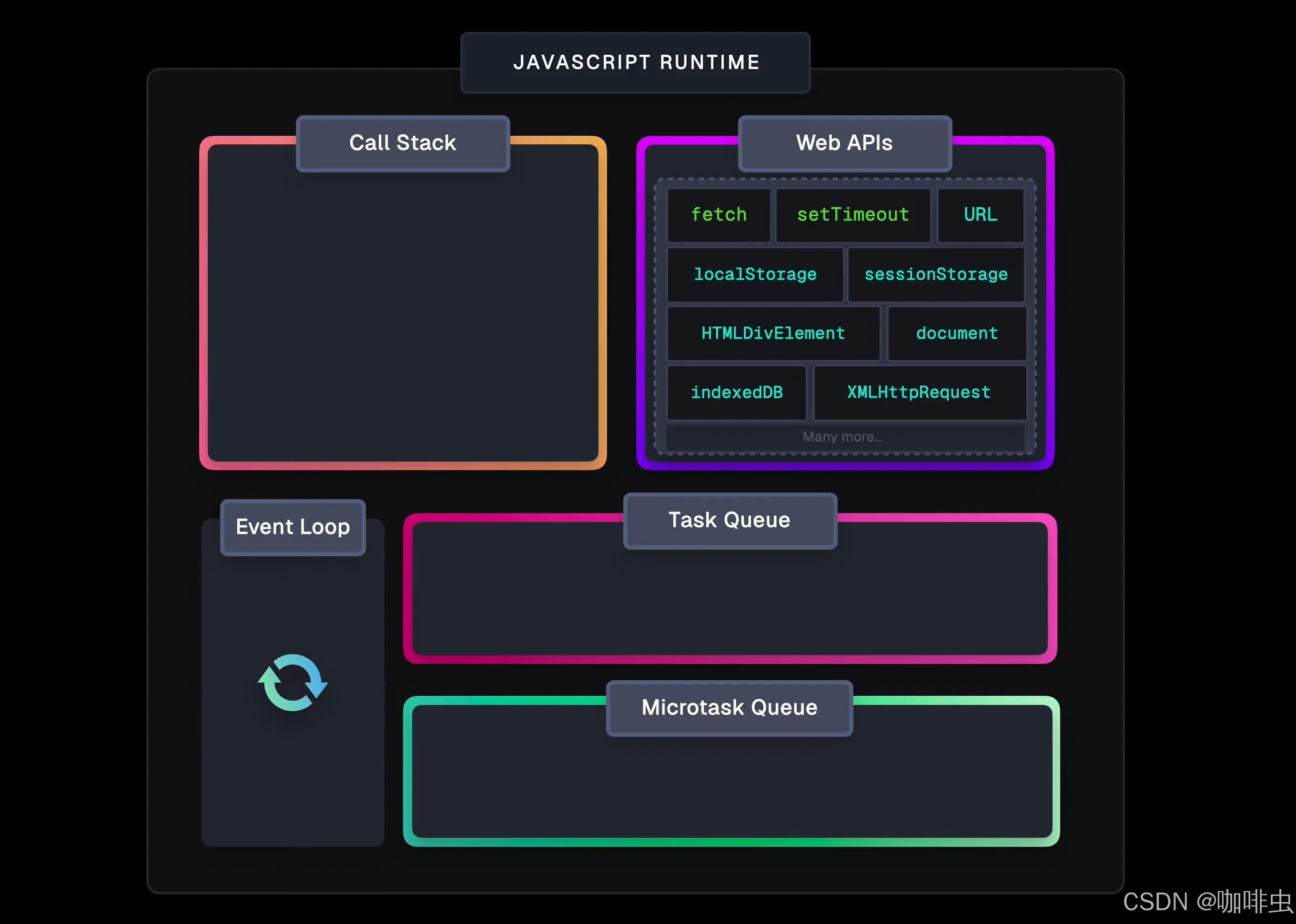
The browser event loop can be remembered with one practical sentence: run one task, clear the microtasks created in that turn, give the browser a chance to render, then move to the next task. Promise.then and queueMicrotask are microtasks. Timers, user events, and many browser callbacks enter later turns as tasks.
That sentence is still a simplification, but it is a better starting point than "microtasks always run before macrotasks." Real browsers manage multiple task sources, rendering opportunities, and host APIs.
What the event loop solves
JavaScript runs code with run-to-completion behavior. Once a function starts executing, another JavaScript callback does not interrupt it halfway through a random line.
The browser still needs to handle timers, network responses, user input, layout, painting, and DOM events. The runtime places callbacks into queues, and the event loop decides when JavaScript gets to run them.
The main pieces are:
- Call stack: the JavaScript functions currently running.
- Host APIs: browser features such as timers, network, and DOM events.
- Task queues: callbacks from timers, input, and other task sources.
- Microtask queue: Promise reactions,
queueMicrotask, and MutationObserver callbacks. - Rendering opportunity: the browser may update style, layout, and paint after JavaScript yields.
"JavaScript is single-threaded" does not mean the browser can only do one thing. It means JavaScript callbacks still have to return to the main thread to run.
One browser event loop turn
A simplified browser turn looks like this:
- Pick and run one task.
- When the call stack becomes empty, perform a microtask checkpoint.
- Keep running microtasks until the microtask queue is empty.
- The browser may update rendering.
- Continue to another task.
New microtasks created while draining microtasks are also run before the browser moves on. That is powerful, but it can also starve rendering and user input.
Common output order
console.log("A")

setTimeout(() => console.log("B: timeout"), 0)

Promise.resolve().then(() => console.log("C: promise"))

queueMicrotask(() => console.log("D: microtask"))

console.log("E")
Output:
A
E
C: promise
D: microtask
B: timeout
Synchronous code runs first. Promise reactions and queueMicrotask callbacks enter the microtask queue in order. The timer callback waits for a later task turn, even with a delay of 0.
Where async and await fit
await pauses the async function and resumes the rest through Promise machinery:
async function run() {
  console.log("2")
  await null
  console.log("4")
}

console.log("1")
run()
console.log("3")
Output:
1
2
3
4
Code before await runs synchronously. Code after await resumes later. Multiple await expressions can create multiple continuations, so analyze the actual queueing order rather than memorizing a single rule.
Microtasks can block rendering
The browser usually waits until the microtask queue is empty before it gets a rendering opportunity. This can become a problem:
function loop() {
  queueMicrotask(loop)
}

loop()
Do not run this in a real page. It demonstrates microtask starvation: the browser can be prevented from handling timers, input, and rendering.
Putting CPU-heavy work into a Promise callback does not move it to a background thread. It still runs on the main JavaScript thread.
Long tasks and page jank
A long synchronous function blocks input and rendering until it finishes:
for (let index = 0; index < 1_000_000_000; index += 1) {
  // heavy synchronous work
}
Depending on the work, better options include:
- Split work into smaller chunks and yield between chunks.
- Use
requestAnimationFramefor visual updates. - Consider
requestIdleCallbackfor non-urgent work, with compatibility checks. - Move truly CPU-heavy work to a Web Worker.
- Reduce unnecessary JavaScript instead of wrapping everything in Promise callbacks.
Browser and Node.js differ
Promise microtasks exist in both environments, but Node.js has its own event loop phases and process.nextTick behavior. Browsers also have rendering, DOM events, and requestAnimationFrame.
When debugging an event loop question, always identify the runtime first.
Debugging checklist
- Number your logs across sync code, Promise callbacks, timers, and event handlers.
- Use the browser Performance panel to find Long Tasks.
- Check whether one event handler parses too much data or renders too much UI.
- Look for recursive Promise or
queueMicrotaskloops. - Do not add
setTimeout(..., 0)blindly; first understand the dependency you are trying to delay.
Related FreeMac guides
- For array iteration choices, read JavaScript Array Methods: map, splice, sort, and for...of.
- For object copying and destructuring, read JavaScript Object Copy: Destructuring, Shallow Copy, and Deep Copy.
- If this behavior appears inside React, also check React Hydration Failed: Causes, Debugging, and Fixes.
Continue reading
Why var and let Behave Differently in for Loops
Use the classic JavaScript closure example to understand why var in a for loop prints 3 3 3, while let creates per-iteration bindings and prints 0 1 2.
8 min readJavaScript var vs let: Function Scope, Block Scope, and Closures
Understand the difference between var and let in JavaScript through function scope, block scope, for loops, closures, and why let avoids the classic 3 3 3 result.
13 min readJavaScript Array Methods: map, splice, sort, and for...of
Choose JavaScript array methods by mutation, return value, early exit, async behavior, and readability: map, filter, reduce, find, slice, splice, sort, toSorted, and for...of.
Subscribe to FreeMac
Weekly picks: free Mac software reviews, trusted source updates, alternatives, and low-friction guides.